Let's talk about the music-making app that's probably already on your device. No, seriously—check your Applications folder or your iPhone's home screen. GarageBand isn't just a toy or a simple voice memo recorder. For millions, it's the gateway drug to music production, a shockingly capable studio that blurs the line between "freebie app" and "professional tool." As someone who's used it for everything from podcast jingles to full song demos, here’s my honest take.
The Unbeatable Entry Point: Why It's a Uniquely Powerful Start
GarageBand’s magic starts with its accessibility. It’s completely free for Apple users. There’s no subscription, no tiered pricing. You get a full-featured digital audio workstation (DAW) for the price of an Apple device. This removes the single biggest barrier to entry for curious beginners.
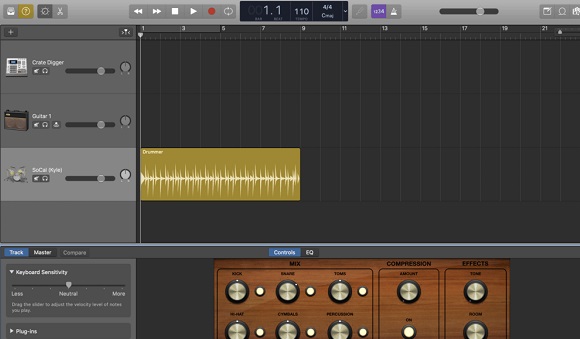
But free doesn't mean barebones. Its interface is intuitively Apple. If you can use an iPhone, you can grasp GarageBand's basics. Dragging loops, recording over them, and arranging sections in the "Timeline" view feels natural. It's designed to get you making sounds—not lost in menus—within minutes.
Where It Truly Shines: My Go-To Uses
I don't use it for everything, but for these tasks, it's often my first choice:
The Ultimate Sketchpad: When a melody or chord progression pops into my head, I can grab my iPhone, open GarageBand, and record a idea with a smart guitar chord strip or the touch keyboard before I forget it. The seamless sync via iCloud means I can open that idea later on my Mac and expand it.
Podcast & Voiceover Production: For clean, professional-sounding spoken audio, it's more than enough. The included "Narrator" vocal presets are excellent starting points, and the noise gate/compressor tools are simple but effective for polishing a recording.
Learning Music Theory (Painlessly): The "Smart Instruments" (like Smart Guitar, Smart Keys) are genius. They let you play complex chords and rhythms by tapping single notes or strumming patterns. It’s a fantastic, low-pressure way to understand how songs are built.
Producing with "Apple Loops": This is a secret weapon. The massive, royalty-free library of professionally recorded drum loops, bass lines, and melodic phrases means you can build a compelling, full-band track even if you don't play a single instrument.
The Flip Side: Understanding Its Limits
GarageBand is a gateway, not always the final destination.
The "Toy" Perception: Its friendly interface can make advanced users dismiss it. Don't be fooled—its core audio engine is robust, but the packaging is designed for approachability.
A Stepping Stone to Logic Pro: Apple positions it perfectly as a pipeline to its professional DAW, Logic Pro. When you hit GarageBand's limits—like needing more detailed MIDI editing, advanced mixing tools, or support for third-party plugin formats—upgrading to Logic Pro feels like coming home. The project files are even compatible.
Platform Lock-In: This is the biggest caveat. It's exclusively for macOS and iOS. If you collaborate with Windows users or plan to switch ecosystems, your projects stay behind.
GarageBand vs. The Field: A Quick Guide
For Apple beginners, podcasters, and idea sketchers: GarageBand is the undisputed champion. The price (free) and integration are unbeatable.
For committed hobbyists or songwriters on any platform: BandLab (free, browser-based) or Tracktion T7 (free, desktop) offer cross-platform freedom with more advanced features.
For aspiring producers ready to invest: Ableton Live (for electronic music and live performance) or Logic Pro (for a seamless GarageBand upgrade) are the industry-standard next steps.
Final Verdict: Who It's Really For
GarageBand is the most generous and well-designed creative introduction any tech company offers. I recommend it without hesitation to:
Anyone with a Mac or iPhone curious about making music or podcasts.
Teachers and students looking for a zero-cost, powerful tool for digital projects.
Seasoned musicians who need a frictionless, always-available sketchpad for ideas.
It won't replace a professional studio setup, and it doesn't try to. Instead, it masterfully removes every excuse for not starting. That’s its real power. It turns "I can't" into "What if I just try this..."—and that’s where all the best creations begin.
Ready to try? Open GarageBand right now, click "New Project," and choose "Voice." Just record yourself saying a few sentences and apply the "Radio Host" preset. In 60 seconds, you'll hear the potential.